The best screenwriting software is the one that helps you finish your script. It should be a place you enjoy writing in and want to return to at every stage, from developing the idea and building the outline to drafting scenes, getting feedback, and revising. If you’re writing with a partner, you should be able to do that work together in the same project.
Arc Studio is our pick for the best screenwriting software in 2026. You can start with loose ideas in the built-in notes app, turn them into story beats on the Plot Board as you build your outline, and reference your notes and outline side-by-side with your screenplay as you write. The editor itself is clean and easy to settle into, and the same project gives you a place to co-write, collect feedback, and revise. One G2 reviewer praised its “beautifully clean interface” and described moving easily between plotting beats, drafting, and collaborating. Arc Studio reviews on G2
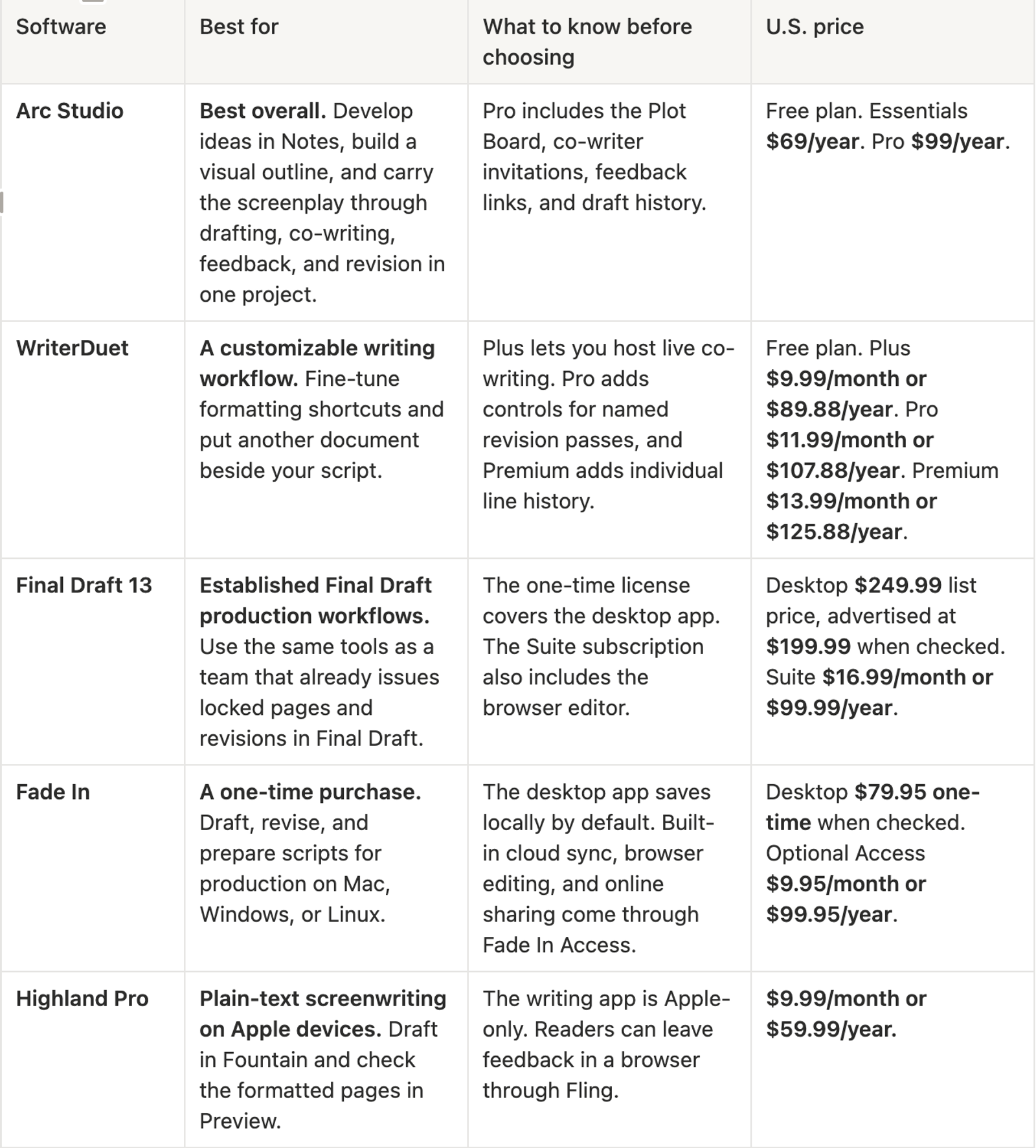
WriterDuet is our pick for a customizable writing workflow. Final Draft 13 makes sense if your production team already relies on it. Fade In is our one-time-purchase pick, and Highland Pro is our pick for plain-text screenwriting on Apple devices.
Writing your first screenplay? Look for an app that lets you jot down ideas, sketch a few scenes, and start writing without having to learn screenplay formatting first. You can start with a character, a place, and something that goes wrong. The rest of the outline can come later.
Arc Studio makes one of the apps in this guide. U.S. prices checked November 24, 2026.
1. Arc Studio — Best overall for screenwriters
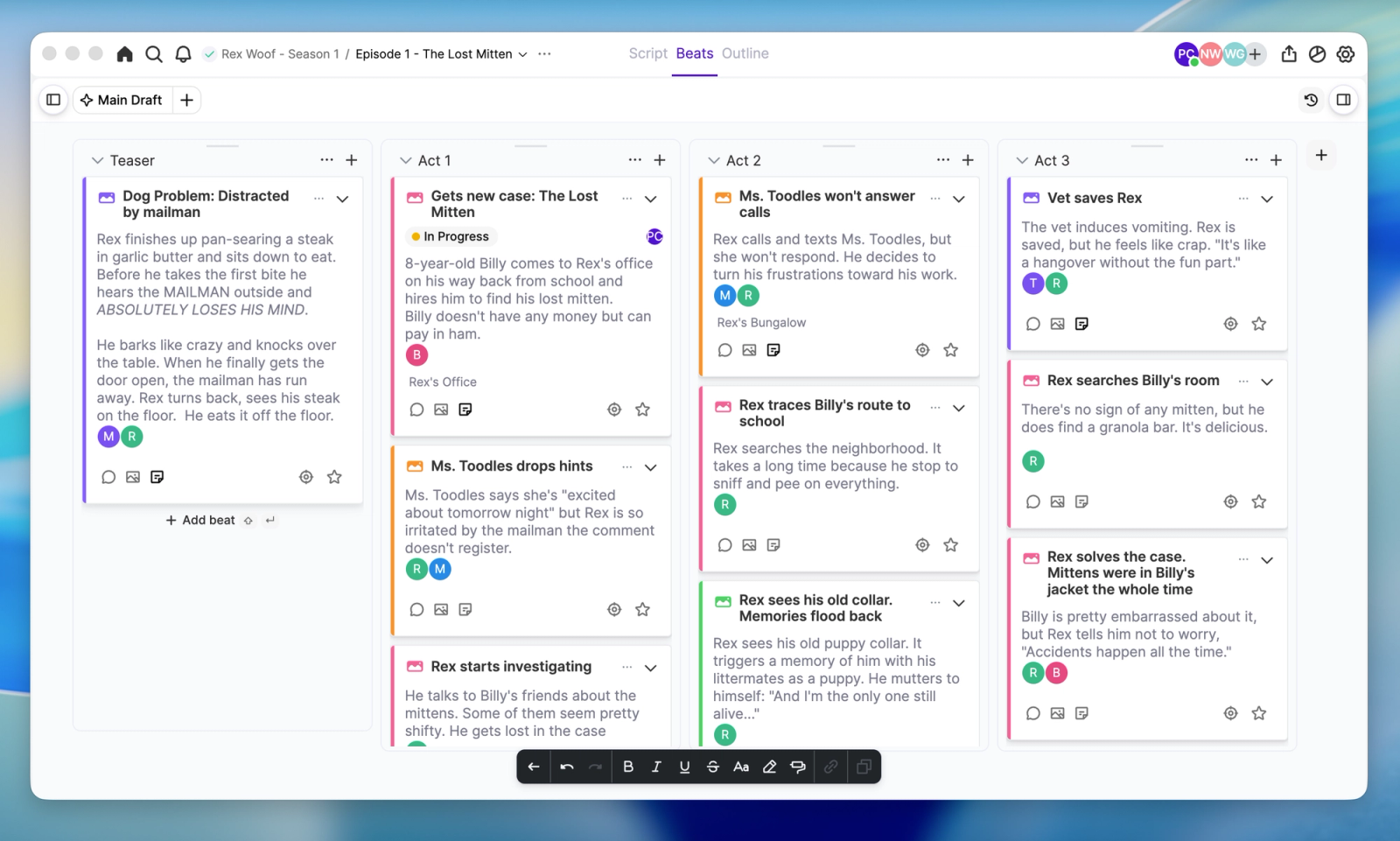
Arc Studio is our pick as the best overall choice for screenwriters because it supports you through the entire writing process, from the first idea to the final rewrite, in one place. Start with a note about a character or a moment you can picture in Arc Studio’s built-in notes app. When one of those ideas becomes something that happens in the story, turn it into a beat on the Plot Board, Arc Studio’s visual outlining tool. A beat can be as simple as “She opens the letter and realizes it was meant for someone else.” Add more beats and drag and drop them to rearrange your structure as you build your outline. Start with an outlining template or build your own structure as the story takes shape. Arc Studio outlining tools
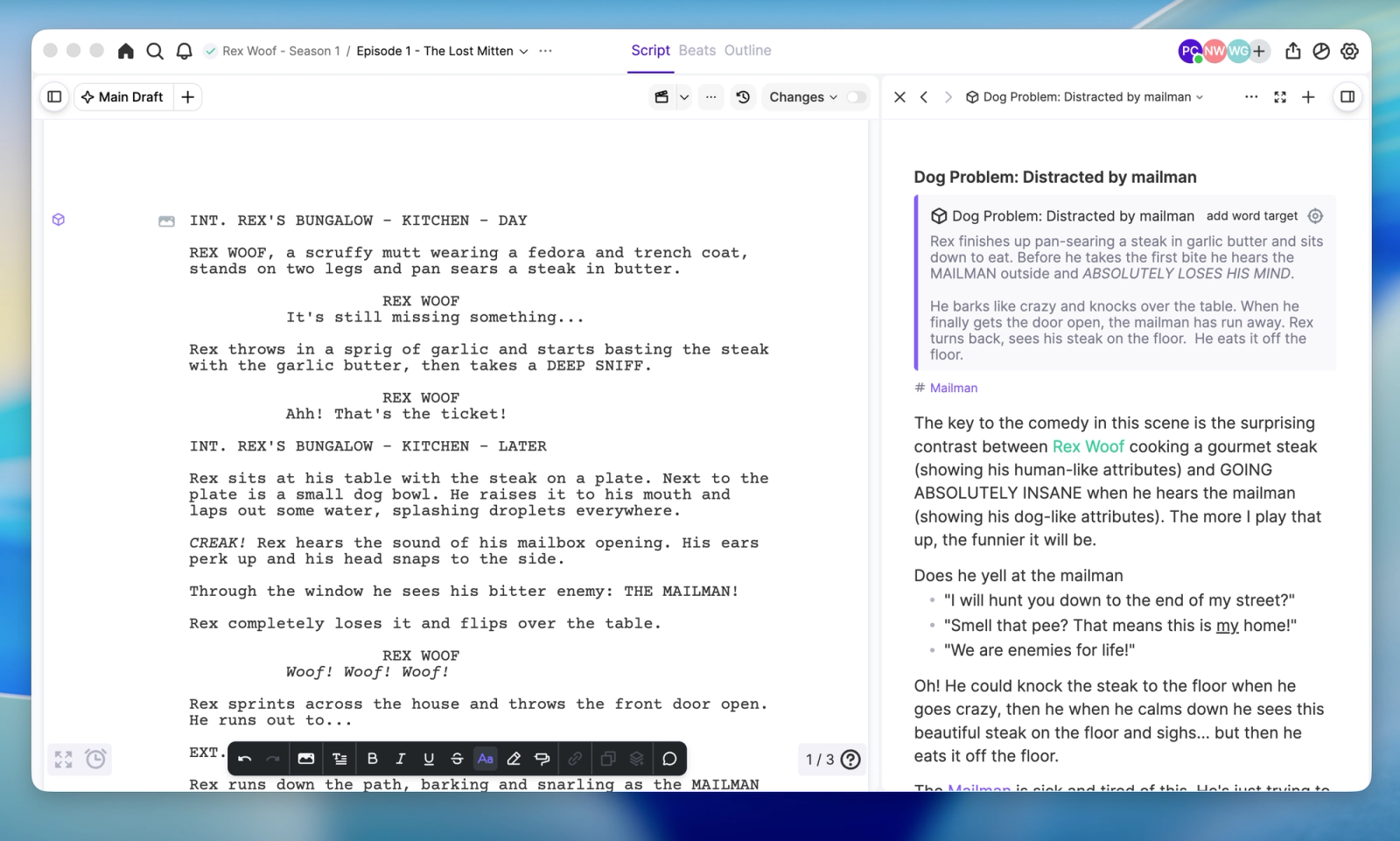
When you’re ready to write your scenes, the editor is clean and automatically formats your script to the industry standard as you type. Switch on Focus Mode for a quieter workspace or keep your beats and notes beside the script. If you decide a reveal belongs earlier, you can move its beat and reorder the linked scenes with it. Beats in Script View · Plot Board guide
You can build the outline with a partner, edit the same script live, and invite readers to leave notes on the draft. Work through those notes in the same project and use draft history to compare versions or recover material you cut. Collaboration and feedback · Draft and revision management
Which plan do you need? Pro ($99/year) includes outlining, collaborator invites, feedback links, and draft history. Essentials ($69/year) includes unlimited scripts, desktop and mobile apps, and unwatermarked PDF export. A free plan is also available. Arc Studio plans
2. WriterDuet — Best for a customizable writing workflow
WriterDuet suits writers who have strong preferences about what happens as you type. You will find the Customize menu full of options for tailoring the display and editing functions of the app, like deciding whether or not typing INT. automatically starts a scene heading, whether an opening parenthesis switches the line to a parenthetical, and whether a formatting shortcut inserts a new line or changes the one you’re on. If you write mostly from the keyboard, those settings let you tune the editor to the way you move through a scene. WriterDuet editing options
The display is adjustable, too. You can choose which tools stay visible, set interface and accent colors, and control whether the editor highlights your current line. Auto-resize keeps the page visible when you narrow the window without changing how the script paginates or exports. On a computer, Split Pane can keep a treatment, another script, or a full card view beside the draft. WriterDuet display settings · Workspace customization · Split Pane
WriterDuet Pro ($11.99/month or $107.88/year) lets you choose which collaborators track and view a named revision pass. That’s useful when one writer is rewriting a scene and another is reviewing the changes. Pro also includes Typewriter Mode, which keeps the line you’re writing at a steady height as the script scrolls. Premium ($13.99/month or $125.88/year) adds individual line history, so you can restore an earlier version of a line of dialogue without rolling back the rest of the scene. WriterDuet plans · Revision settings · Line history
3. Final Draft 13 — Best for established Final Draft production workflows
Final Draft has been around long enough that many screenwriters learned to write their first scripts in it. It’s familiar across film and television, and there’s a practical advantage to using a tool the rest of your team already knows. As you type, Final Draft takes care of the layout for scene headings, action, and dialogue, so you can get on with writing the scene. Final Draft 13
There’s also something here for writers who like to plan against page count. Use the Beat Board to collect ideas and move them around while you’re figuring out the story. Then place those beats on the Outline Editor’s page-based timeline, where you can give acts, sequences, and individual beats their own lanes. If you want a reveal around page 30 and the reveal currently lands on page 40, you can see that gap alongside the scenes you’ve already written. Final Draft 13 user guide
Final Draft is especially useful once people start making production decisions from your script. Say you add half a page to a scene after the script has gone out to the crew. With pages locked, if the new material spills past page 24, the overflow can go on page 24A, leaving page 25 where everyone expects it. Revision marks show which lines changed, and scene, location, and character reports help the production team pull out the details it needs. Final Draft 13 · Final Draft’s guide to script reports
Which version do you need? Final Draft 13 is the desktop app for Mac and Windows. It lists for $249.99 and was advertised at $199.99 when checked. Final Draft Suite costs $16.99/month or $99.99/year and includes the desktop app plus Final Draft Cloud for browser-based writing, storage, and sharing. Final Draft pricing
Choose Final Draft 13 if your team already uses it to circulate scripts and manage production revisions. If the person receiving your script simply needs an editable .fdx file, Arc Studio, WriterDuet, Fade In, and Highland Pro can all export one.
4. Fade In — Best one-time purchase
Fade In is our pick if you want to buy your screenwriting software outright. The desktop app runs on Mac, Windows, and Linux and can take a script from first draft through production. It formats the screenplay as you write, and its Navigator lets you jump between scenes, rearrange them, and group them into sequences. Fade In features
One of its best tools comes into play when a character sounds sharp in the first act and oddly formal in the third. Dialogue Tuner puts all of that character’s lines in one place so you can spot the shift and edit as you go. Once the script goes into production, Fade In can lock pages and scenes, issue colored revisions, and generate cast, location, and scene reports. Fade In features
The desktop app saves files locally by default. Built-in cloud sync, browser editing, and online sharing require the separate Fade In Access subscription. Fade In imports and exports editable Final Draft .fdx files, but pagination can shift when you move a script between apps. That’s worth checking if the crew is already working from a numbered draft. Fade In Access FAQ · Fade In’s guide to pagination differences
What does it cost? The Fade In desktop app is listed at $79.95 as a one-time purchase. Fade In Access costs $9.95/month or $99.95/year. Fade In pricing · Fade In Access pricing
5. Highland Pro — Best for plain-text screenwriting on Apple devices
Highland Pro is our pick if you like the feel of a text editor. Created by screenwriter John August, it uses Fountain, a plain-text format for screenplays. Type a scene heading, a character name, and a line of dialogue, and Highland recognizes the screenplay elements as you go. When you want to see how the finished pages read or where a page breaks, switch to Preview. Highland quick-start guide
You can keep notes and scene summaries inside the draft. If you know what a scene needs to accomplish and haven’t found the dialogue yet, leave yourself a synopsis and keep writing. Later, you can mark changes with revision colors and margin stars, then export a PDF for readers or a Final Draft .fdx file for someone who needs an editable script. Highland Pro features
How does feedback work? Highland’s Fling feature lets you share a draft with readers and collect their comments in the app. You control which draft they see, and you can jump from a note to the passage it refers to while you revise. Highland Fling
The Highland Pro writing app runs on supported Apple devices, including Mac, iPad, and iPhone. It does not run on Windows PCs, Linux computers, Chromebooks, or Android phones and tablets, and there’s no browser-based writing editor. Fling gives readers browser access to leave feedback. Editing the screenplay happens in the Highland app. Highland Pro compatibility · Highland Fling
What does it cost? Highland Pro costs $9.99/month or $59.99/year in the U.S. One subscription covers Mac, iPad, and iPhone. If it lapses, you can still open and export your scripts in read-only mode. U.S. App Store pricing · Highland subscription FAQ
What is the best screenwriting software for writing with a partner?
Arc Studio is our pick for partners who want to work together from the first outline through the final rewrite. Both writers can edit the same screenplay live and work through reader notes in the same project. The project owner needs Pro to invite co-writers or create feedback links. An invited co-writer can draft and edit with a Free account or join as a guest through an email invitation with guest access. Each writer who wants to use the outlining tools needs Pro. Readers can leave notes without creating an account if you send them an individual feedback invitation by email. Arc Studio co-writing comparison · Collaborator invites · Feedback invitations
WriterDuet is another good option if you and your partner like to customize how you work together. You can each arrange your workspace around the tools you use most. One of you might keep the treatment open beside the script in Split Pane while the other keeps the editor focused on the page. On Pro, you can also choose who tracks and sees a named revision pass, which is handy when one partner is rewriting and the other is reviewing. The project owner needs Plus or higher to invite a co-writer to edit, and the invited writer can join with a free account. Workspace customization · Split Pane · Revision settings · WriterDuet plans
What screenwriting software has the best outlining tools?
Arc Studio is our pick if you want to keep shaping the story while you write. Use the Plot Board when you need to see the whole story and work out the order of a sequence. While you draft, keep your beats visible beside the screenplay in the Contents sidebar. If you realize a reveal belongs two scenes earlier, you can move its beat in the outline and reorder the linked scenes with it. Final Draft 13 is a good fit if you like to place beats against target page numbers. WriterDuet is a good choice if you build your outline scene by scene and use Cards view to group scenes into sequences. Arc Studio Plot Board guide · Final Draft 13 · WriterDuet outlining tools
What are the best alternatives to Final Draft?
- Fade In is our pick if you want a lower-cost desktop app you can buy outright, or if you write on Linux. Fade In pricing and platforms
- Arc Studio is our pick if you want to develop the story, draft scenes, and revise after feedback in the same project. Arc Studio and Final Draft comparison
- WriterDuet is a good choice if you want the editor to follow your preferred typing shortcuts, or if you regularly write with another document open beside the script. WriterDuet editing options · Split Pane
- Highland Pro is a good choice if you write on Apple devices and prefer to draft in plain text, then switch to a formatted preview. Highland quick-start guide
If compatibility is driving the decision, ask what the people receiving your script need. All four alternatives can export an editable .fdx file. If your team expects you to work directly in Final Draft with locked pages and production revisions, Final Draft 13 is the practical choice. Final Draft 13 · Arc Studio export formats · Fade In file compatibility · WriterDuet export formats · Highland Pro features
What is the best screenwriting software for a one-time purchase?
Fade In is our pick for writers who want to buy their screenwriting software outright. It runs on Mac, Windows, and Linux, imports and exports Final Draft .fdx files, and includes tools for rewriting, such as Dialogue Tuner. Choose Final Draft 13 if you want a one-time desktop license and your production team already uses Final Draft to manage locked pages and revisions. Fade In pricing · Fade In features · Final Draft pricing
What is the best screenwriting software for customization?
WriterDuet is our pick for writers who want to customize how their editor looks and behaves. You can decide whether typing INT. automatically starts a scene heading, whether a shortcut inserts a new line or reformats the current one, and which tools stay visible while you write. On a computer, Split Pane lets you keep a treatment, another script, or a full card view beside your draft. If you spend a lot of time switching between a script and reference material, that’s a concrete reason to choose it. WriterDuet editing options · Display settings · Split Pane
What screenwriting software should I use for my first screenplay?
Arc Studio is our pick for a first screenplay if you want a clean editor and room to develop the story as you go. Start by writing one scene you can picture. The editor automatically formats your script to industry standards. If you find yourself collecting ideas and trying to work out which scene comes next, use Notes and the Plot Board to shape those ideas into an outline.
What screenwriting software should I use?
Start with Arc Studio if you want one app to help you finish your next screenplay. You can open it before you know how the story ends, use it to work out the outline and write the scenes, then come back to the same project when the notes arrive. That makes it our everyday pick for both solo writers and writing partners.
Choose WriterDuet if you want to fine-tune your workspace, Highland Pro if you prefer drafting in Fountain on Apple devices, Fade In if you want to buy once, or Final Draft 13 if your production team already works in it.
